Skip to content
Ontoor blogs
  • Videos
    • APEX hours
    • Ontoor Concepts
    • Ontoor Shorts
    • Ontoor Extras
  • Links
    • APEX Tutorials
    • Ontoor Plugins
    • Web Tutorials
    • Events and Webinars
  • Categories
    • APEX
      • APEXOracle APEX RELATED posts
      • APEX Tutorials
      • APEX Plugins
      • Interactive Grid
    • Oracle
      • ORACLE
      • SQL
      • PLSQL
    • Shorts
    • JavaScript
Setup Meeting
Home » How to Set Custom Login background in Oracle APEX

How to Set Custom Login background in Oracle APEX

Posted by Vikas Pandey April 3, 2020Posted inAPEX

How Set Custom Login background in Oracle APEX
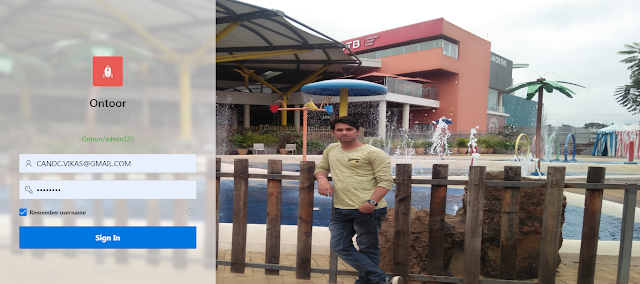
Oracle APEX 20.1 has given default solution for changing only background colour but sometimes user want to set his custom picture on that case this post will help you to set custom login background Image.

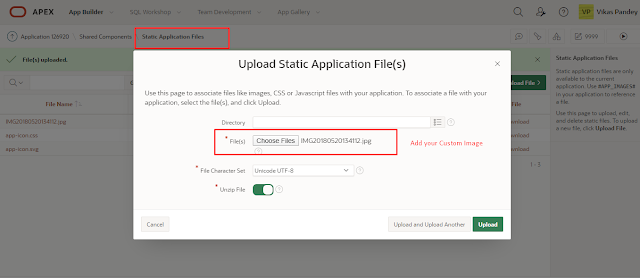
  • Step 1. Upload your static image. 
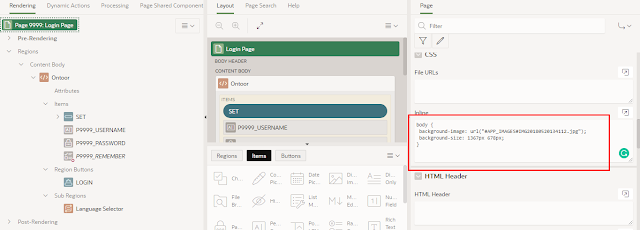
  • Solution: Copy and paste following code inside the page inline section. Use uploaded image URL inside the background image URL.
Copy CodeCopiedUse a different Browser
body {
    background-image: url("#APP_IMAGES#IMG20180520134112.jpg");
    background-size: 1400px 700px;
}
Demo

You might like:

  • Preserve Checkbox state while Paginating in Interactive/Classic Report Oracle APEX
  • How to Create Dynamic Navigation Menu in Oracle APEX
Tags:
APEXBackground ImageLoginVikas Pandey
Vikas Pandey
I am an Oracle APEX Architect and Senior Consultant with 9+ years of hands-on experience in designing, developing, and modernizing enterprise applications using Oracle APEX, Oracle Database, SQL/PLSQL, and ORDS. My professional journey spans pharmaceutical consulting, insurance, healthcare, and enterprise product development, where I have delivered scalable, secure, and performance-optimized solutions for Indian and global clients. Currently, I work as a Senior Consultant at Ernst & Young (EY), focusing on application architecture, data migration, performance tuning, advanced reporting, and system integrations. As an Oracle ACE Associate, I strongly believe in architectural clarity, best practices, and mentoring teams to build long-term sustainable Oracle solutions.
View All Posts

Post navigation

Previous Post
Master Detail with Interactive Grid
Next Post
How to Add YouTube Videos on Page in Oracle APEX
  • OCI
  • Forms to APEX
  • Reporting
  • 2026 9
  • 2025 11
  • 2024 32
  • 2023 22
  • 2022 26
  • 2021 54
  • 2020 123
  • 2017 12
  • 2016 5
  • 2015 1
Recent Posts
  • PostgreSQL as an Oracle Alternative
  • Oracle APEX Template Directives
  • Displaying Images in Oracle APEX Using (Oracle Cloud Infrastructure) OCI Object Storage
  • Using APEX Collections Safely: Avoiding Session State Leaks
  • Bringing AI to Oracle APEX: Real-World RAG with Oracle 23ai
Categories
  • APEX 226
  • APEX Hours 3
  • APEX Tutorials 18
  • APEX_AUTOMATION 4
  • APEX_JSON 2
  • APEX_WEB_SERVICE 2
  • API 1
  • CSS 1
  • DBA 3
  • Deprecated 1
  • Events and Webinars 6
  • GITHUB 3
  • IG 23
  • Interactive Grid 39
  • Interactive Report 1
  • JavaScript 21
  • JS_API 2
  • OCI 4
  • Ontoor Concepts 5
  • Ontoor Extras 1
  • ORACLE 44
  • Oracle 23 ai 1
  • Oracle Tutorials 1
  • ORACLE_FORMS 1
  • ORDS 4
  • Others 4
  • PLSQL 13
  • PLUGINS 12
  • PostgreS 1
  • Reporting 1
  • Shorts 9
  • SQL 18
Copyright © 2026 Ontoor Solutions. All Rights Reserved.
Copyright 2026 — Ontoor blogs. All rights reserved. Bloghash WordPress Theme
Scroll to Top