Printing in Oracle APEX has always been a tricky area.
Most applications end up printing the entire page, including navigation menus, headers, buttons, and unwanted UI elements. This becomes a real problem when the requirement is to print only a specific region, such as an invoice, report section, salary slip, or certificate.
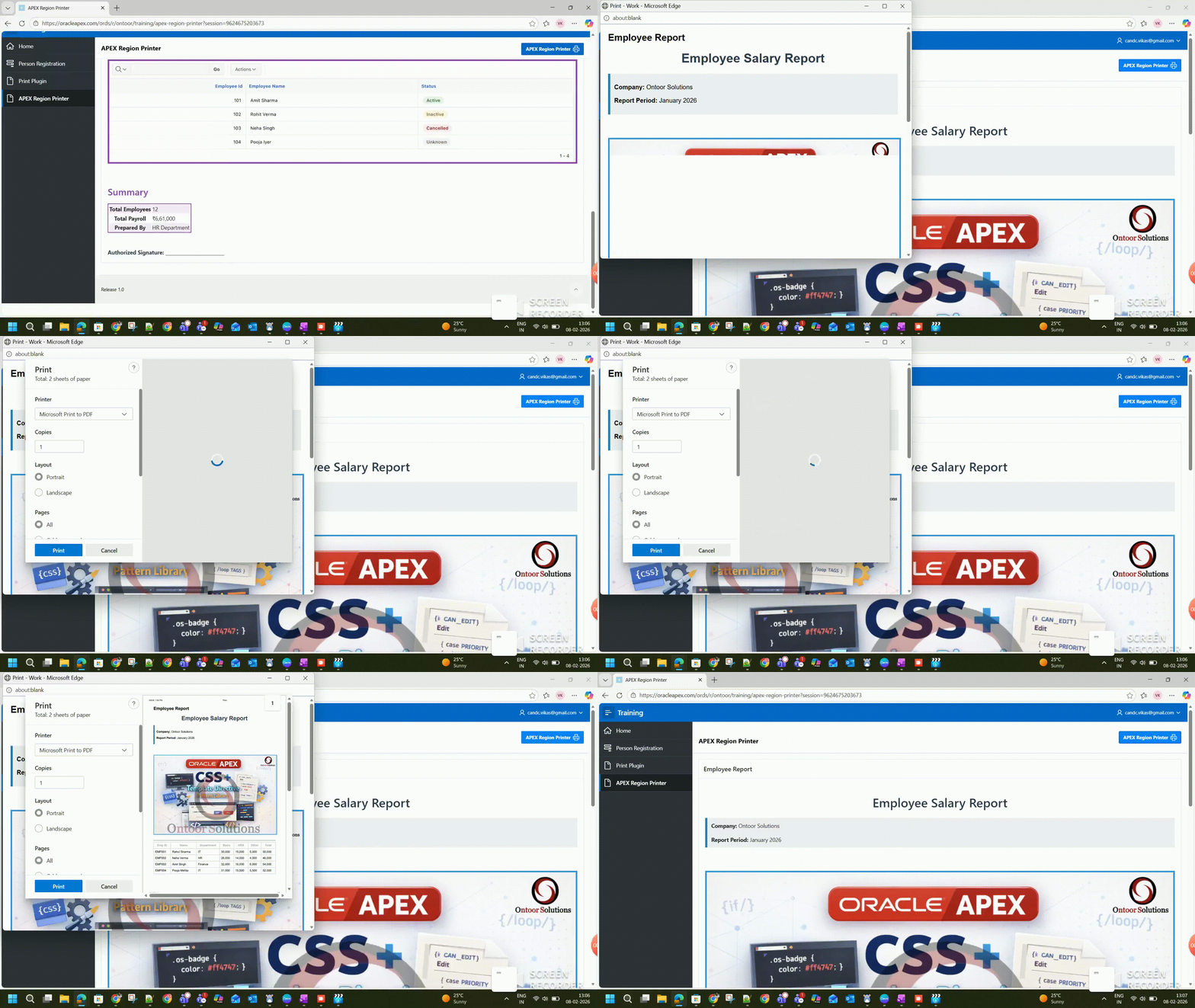
To solve this problem in a clean and reusable way, I built a Dynamic Action plugin called APEX Region Printer.
This blog explains:
- What the plugin does
- How it works internally
- Two real-world use cases
- Step-by-step usage in an Oracle APEX page
- Repository and demo details
What is APEX Region Printer?
APEX Region Printer is a Dynamic Action plugin for Oracle APEX that allows you to print only a specific region or HTML container, instead of the whole page.
The plugin is:
- Fully client-side
- Lightweight
- Image-safe
- Multi-page friendly
- Easy to reuse across applications
It works by targeting a Region Static ID and invoking browser print functionality only for that content.
Key Features
- Print any APEX region or HTML container
- Supports images, logos, and banners
- Supports multi-page content
- Color and border-friendly print output
- Hides screen-only elements using
.no-print - No server-side processing
- No page reload
- Reusable Dynamic Action plugin
Plugin Repository
The repository includes:
- Plugin export
- JavaScript source
- Preview GIF
- Documentation
How the Plugin Works (High Level)
Internally, the plugin:
- Loads a JavaScript library containing the print logic.
- Accepts one attribute: the Region Static ID.
- Extracts the HTML of the target region.
- Renders it into a clean, off-screen print window.
- Waits for images to load.
- Opens the browser print dialog.
- Automatically closes the print window.
This approach avoids:
- Printing the full APEX page
- CSS conflicts with Universal Theme
- Broken images in print output
Plugin Configuration
The plugin uses only one attribute:
| Attribute | Description |
|---|---|
| Region Static ID | Static ID of the region or container to print |
This simplicity makes the plugin easy to adopt and hard to misuse.
Use Case 1: Printing an Invoice Region
This use case shows how to print an invoice section from an Oracle APEX page while excluding unnecessary page elements. The goal is to print only the invoice content, without buttons, menus, or other UI components.
Step 1: Create the Invoice Region
Create a Static Content or Report region that contains the invoice layout and HTML. This region will represent the printable invoice.
Assign a Static ID to the region, for example: invoice_print.
Step 2: Mark Screen-Only Elements
Any buttons or UI elements that should not appear in the print can be marked using the .no-print CSS class. These elements will remain visible on screen but will be hidden when printing.
Step 3: Create a Print Button
Add a button on the page (for example, PRINT_INVOICE) that users can click to print the invoice.
Step 4: Configure the Dynamic Action
Create a Dynamic Action on the button click and add the APEX Region Printer as the True Action.
Specify the invoice region using its Static ID (invoice_print).
Step 5: Run and Print
Run the page and click the Print Invoice button. The browser’s print dialog opens, showing only the invoice content, ready for clean and professional printing
Use Case 2: Printing a Salary Slip or Report Section
In many Oracle APEX applications, you often need to print a salary slip or a specific part of a page without including the full application layout. A salary slip usually contains employee details, salary breakup, deductions, and net pay, but elements like the page header, side menu, buttons, or other regions should not appear in the print.
With the APEX Region Printer plugin, you can print only the required region by assigning it a Static ID (for example, salary_slip). This lets you design the salary slip like a proper document, including logos, tables, colors, borders, and even content that spans multiple pages. The plugin keeps the layout and styling intact during printing.
A simple print button triggers a Dynamic Action that calls the plugin for the selected region. The result is a clean, professional salary slip print, without any extra UI elements. Images render correctly, and multi-page printing works smoothly.
You can further improve the output by hiding unwanted elements using a .no-print CSS class. For better results, use borders and text colors instead of relying only on background colors, and enable background graphics in the browser’s print settings.
Key Points
- Prints only the salary slip or selected report section
- Removes headers, menus, and action buttons
- Supports logos, styles, and multi-page content
- Easy setup using a button and Dynamic Action
- Clean, professional print output

Important Browser Notes
- Browser default headers and footers (date, URL, page numbers) are controlled by the browser.
- They cannot be removed programmatically.
- Users can disable them from the browser print dialog if needed.
This is expected browser behavior and not a plugin limitation.
Why Use This Plugin?
Compared to ad-hoc JavaScript solutions, APEX Region Printer offers:
- Reusability
- Clean architecture
- No page-level JS clutter
- Consistent behavior across pages
- Easy adoption by other developers
It is ideal for enterprise APEX applications where printing is a recurring requirement.
About Me
Vikas Pandey
Senior Oracle APEX Developer
- GitHub: https://github.com/vikasapexian
- Blog: https://blogs.ontoorsolutions.com/
- Twitter: @smith121266
- LinkedIn: https://www.linkedin.com/in/vikas-pandey-aba223120/
Final Thoughts
Printing is one of those features that seems simple but quickly becomes messy without a proper approach.
APEX Region Printer provides a clean, reusable, and professional solution for region-based printing in Oracle APEX applications.
If you use Oracle APEX and deal with invoices, reports, or printable documents — this plugin can save you time and keep your applications clean.