In modern Oracle APEX applications, storing images inside database tables is rarely the best option.
OCI Object Storage gives you scalability, better performance, and lower cost.
This article explains how to display images in Oracle APEX using only OCI Object Storage, covering:
- Secure image access
- Pre-Authenticated Requests (PAR)
- Friendly URLs
- Performance and caching
- A complete working flow

Why OCI Object Storage for Images
OCI Object Storage is ideal for images because:
- No database size growth
- Built for large binary files
- Secure by default
- Works cleanly with APEX and ORDS
- Supports time-bound access via PAR
OCI does not allow public access by default, which is good.
It forces you to be explicit about how images are exposed.
Two Correct Ways to Display OCI Images in APEX
There are only two production-safe approaches.
1. APEX Proxy (Secure)
Browser → APEX → OCI Object Storage- Image fetched by APEX using credentials
- Streamed to browser
- Fully session-controlled
2. Pre-Authenticated Request (PAR) (Fast)
Browser → OCI Object Storage- Temporary public URL
- No APEX load
- Best for galleries and thumbnails
We’ll cover both, starting with PAR.
Full OCI PAR Generation Code (PL/SQL)
This function generates a browser-ready PAR URL for a single object.
What it does
- Creates an object-level PAR
- Sets expiry in hours
- Returns a direct URL usable in <img src>
PL/SQL Function
CREATE OR REPLACE FUNCTION get_object_par_url (
    in_region        IN VARCHAR2,   -- ap-mumbai-1
    in_namespace     IN VARCHAR2,   -- OCI namespace
    in_bucket_name   IN VARCHAR2,   -- bucket name
    in_object_name   IN VARCHAR2,   -- images/product1.jpg
    in_expiry_hours  IN NUMBER DEFAULT 24
) RETURN VARCHAR2
IS
    l_response     CLOB;
    l_access_uri   VARCHAR2(4000);
    l_expiry_ts    VARCHAR2(50);
BEGIN
    l_expiry_ts :=
        TO_CHAR(
            SYSTIMESTAMP AT TIME ZONE 'UTC'
            + NUMTODSINTERVAL(in_expiry_hours, 'HOUR'),
            'YYYY-MM-DD"T"HH24:MI:SS"Z"'
        );

    l_response :=
        apex_web_service.make_rest_request(
            p_url         => 'https://objectstorage.' || in_region ||
                             '.oraclecloud.com/n/' || in_namespace ||
                             '/b/' || in_bucket_name || '/p/',
            p_http_method => 'POST',
            p_body        => '{
                "name":"img_par_' || DBMS_RANDOM.STRING('X', 8) || '",
                "accessType":"ObjectRead",
                "objectName":"' || in_object_name || '",
                "timeExpires":"' || l_expiry_ts || '"
            }'
        );

    l_access_uri := json_value(l_response, '$.accessUri');

    RETURN 'https://objectstorage.' || in_region ||
           '.oraclecloud.com' || l_access_uri;
END;
/
Using PAR in APEX
Generate URL in SQL
SELECT get_object_par_url(
           'ap-mumbai-1',
           'a78hhjasl9djjkmz',
           'product-images',
           'products/p1001.jpg',
           6
       ) AS image_url
FROM dual;
Display in APEX
<img src="#IMAGE_URL#" alt="Product Image" loading="lazy">

#IMAGE_URL# is the URL placeholder
This is:
- Fast
- CDN-friendly
- Perfect for cards, galleries, sliders
Secure Approach: Proxy OCI Images Through APEX
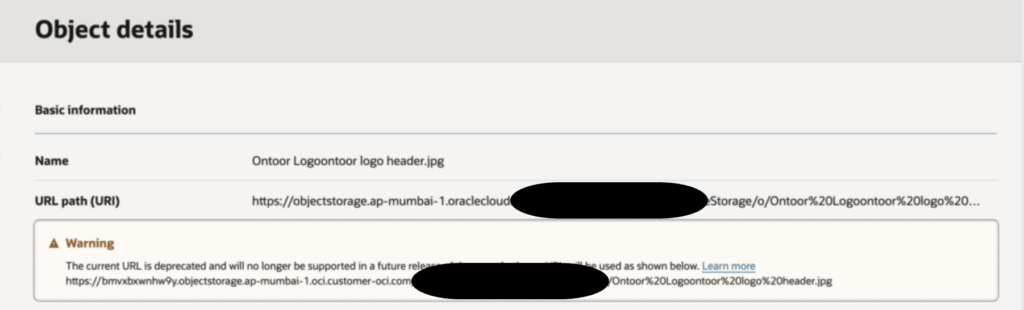
Direct URL is restricted for security.
Use this when:
- Images are sensitive
- Access depends on user role
- You don’t want public URLs
On-Demand Application Process (APEX)
Create an Application Process named GET_OBJECT_FILE.
DECLARE
    l_blob      BLOB;
    l_mime_type VARCHAR2(100);
BEGIN
    l_blob := apex_web_service.make_rest_request_b(
        p_url         => :P0_OBJECT_URL,
        p_http_method => 'GET'
    );

    l_mime_type := apex_util.get_mime_type(:P0_FILE_NAME);

    owa_util.mime_header(l_mime_type, FALSE);
    htp.p('Content-Disposition: inline; filename="' || :P0_FILE_NAME || '"');
    owa_util.http_header_close;

    wpg_docload.download_file(l_blob);
    apex_application.stop_apex_engine;
END;
Generate Friendly URL
APEX_PAGE.GET_URL(
    p_page    => 0,
    p_request => 'APPLICATION_PROCESS=GET_OBJECT_FILE',
    p_items   => 'P0_OBJECT_URL,P0_FILE_NAME',
    p_values  => object_url || ',' || file_name
)
Use in HTML
<img src="#IMAGE_URL#" alt="Secure Image">Complete APEX + OCI Demo Flow
Here’s the end-to-end flow most real apps use.
- Images uploaded to OCI bucket
- Image paths stored in table (only metadata)
- APEX page queries image paths
- For each image:
- Generate PAR (external users)
- OR proxy via APEX (internal users)
- Browser displays image
Image Caching Strategy (Very Important)
Without caching, image pages will feel slow.
For PAR URLs
- OCI already supports HTTP caching
- Keep PAR expiry ≥ image cache lifetime
- Use browser caching
<img src="PAR_URL" loading="lazy">Best for:
- Product images
- Thumbnails
- Public galleries
For APEX-proxied Images
Add cache headers:
htp.p('Cache-Control: private, max-age=3600');
htp.p('Pragma: cache');
This allows:
- Browser caching
- Reduced APEX load
- Faster page rendering
Works perfectly with:
- PAR URLs
- APEX proxy URLs
- Normal APEX pages
Potential errors:
- BucketNotFound
- Either the bucket named <bucket_name> does not exist in the namespace <namespace> or you are not authorized to access it
Final Recommendation
Use this rule:
- Internal or sensitive images → APEX proxy
- Public or high-traffic images → PAR
OCI Object Storage + APEX works extremely well when used correctly.

Related articles