Below is a ready-to-use CSS + Template Directive pattern library you can drop into any Oracle APEX application.
This is meant to be practical, consistent, and team-friendly. No experiments, only patterns that work in real projects.
You can think of this as a mini design system for templates.
Core CSS (Add Once Per App)
Add this in:
- Shared Components → Static Application Files or
- Theme Roller → Custom CSS
/* ===== Status Badges ===== */
.os-badge {
  display: inline-block;
  padding: 0.25rem 0.6rem;
  border-radius: 12px;
  font-size: 0.75rem;
  font-weight: 600;
  line-height: 1;
  white-space: nowrap;
}

.os-badge--success { background: #e6f4ea; color: #137333; }
.os-badge--warning { background: #fef7e0; color: #8a6d1d; }
.os-badge--danger  { background: #fdecea; color: #a50e0e; }
.os-badge--info    { background: #e8f0fe; color: #1a73e8; }
.os-badge--muted   { background: #f1f3f4; color: #5f6368; }

/* ===== Action Links ===== */
.os-link {
  color: #1a73e8;
  text-decoration: none;
  font-weight: 500;
}
.os-link:hover {
  text-decoration: underline;
}

/* ===== Empty State ===== */
.os-empty {
  color: #757575;
  font-style: italic;
}

/* ===== Tags ===== */
.os-tag {
  display: inline-block;
  margin: 0 4px 4px 0;
  padding: 0.2rem 0.5rem;
  border-radius: 10px;
  font-size: 0.7rem;
  background: #f1f3f4;
  color: #3c4043;
}

/* ===== Priority Accents ===== */
.os-priority-high   { border-left: 4px solid #d93025; padding-left: 6px; }
.os-priority-medium { border-left: 4px solid #f9ab00; padding-left: 6px; }
.os-priority-low    { border-left: 4px solid #188038; padding-left: 6px; }
This CSS is neutral, readable, and works well with Universal Theme.
Status Badge Pattern
Template Directive
{case STATUS/}
{when ACTIVE/}
<span class="os-badge os-badge--success">Active</span>
{when INACTIVE/}
<span class="os-badge os-badge--warning">Inactive</span>
{when CANCELLED/}
<span class="os-badge os-badge--danger">Cancelled</span>
{otherwise/}
<span class="os-badge os-badge--muted">Unknown</span>
{endcase/}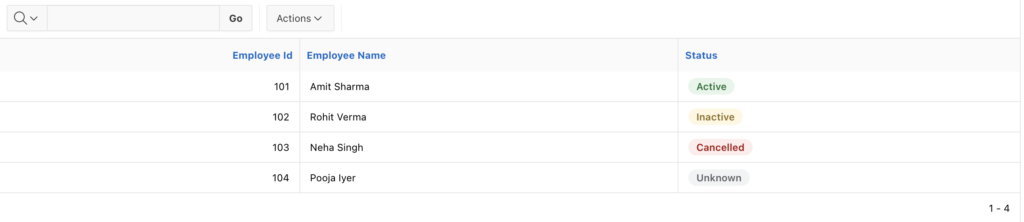
Where to use
- Classic Reports
- Cards
- Interactive Reports
- Emails (inline-safe)
Boolean Flag Pattern (Y/N, 1/0)
{if FLAG/}
<span class="os-badge os-badge--success">Yes</span>
{else/}
<span class="os-badge os-badge--muted">No</span>
{endif/}
Action Link with Permission
{if CAN_EDIT/}
<a class="os-link"
   href="f?p=&APP_ID.:10:&SESSION.::NO::P10_ID:&ID.">
   Edit
</a>
{else/}
<span class="os-empty">View only</span>
{endif/}
Clean, readable, and safe.

Priority Indicator (Visual + Text)
{case PRIORITY/}
{when HIGH/}
<div class="os-priority-high">
  <span class="os-badge os-badge--danger">High</span>
</div>
{when MEDIUM/}
<div class="os-priority-medium">
  <span class="os-badge os-badge--warning">Medium</span>
</div>
{when LOW/}
<div class="os-priority-low">
  <span class="os-badge os-badge--success">Low</span>
</div>
{endcase/}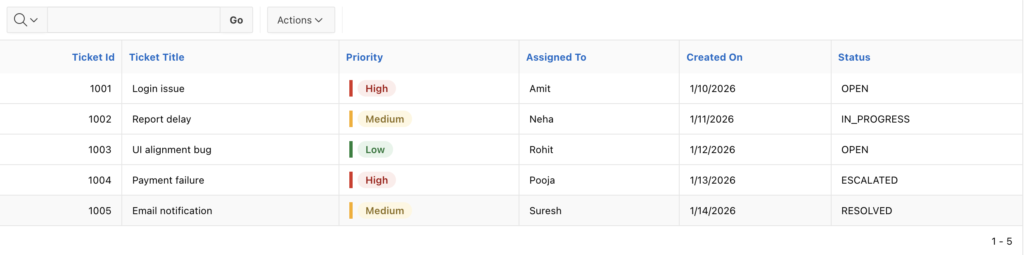
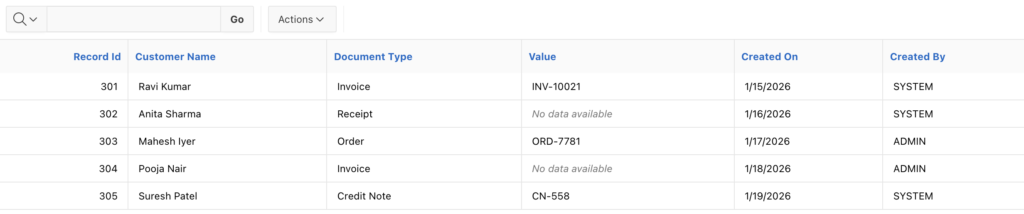
Empty State Pattern (Highly Recommended)
{if VALUE/}
&VALUE.
{else/}
<span class="os-empty">No data available</span>
{endif/}
Use this everywhere instead of blank cells.
Tags / Labels Pattern
{loop "," TAGS/}
<span class="os-tag">&APEX$ITEM.</span>
{endloop/}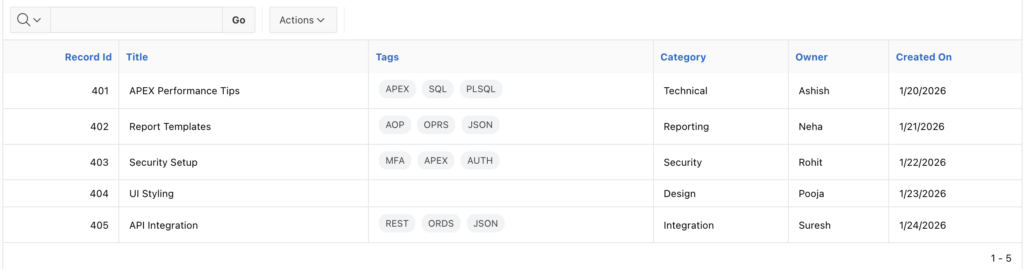
Highlight Special Tags (Loop + Case)
{loop "," TAGS/}
    {case APEX$ITEM/}
    {when Critical/}
        <span class="os-badge os-badge--danger">&APEX$ITEM.</span>
    {when Internal/}
        <span class="os-badge os-badge--warning">&APEX$ITEM.</span>
    {otherwise/}
        <span class="os-tag">&APEX$ITEM.</span>
    {endcase/}
{endloop/}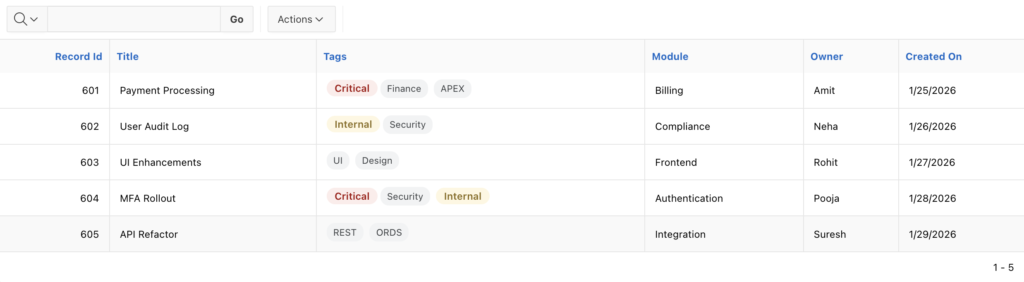
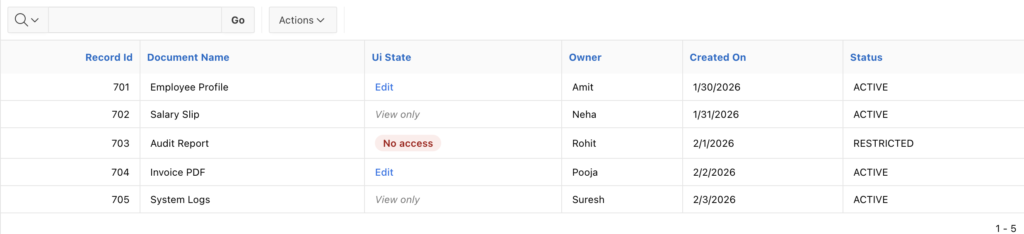
UI State Pattern (Cleanest Architecture)
SQL
CASE
    WHEN can_edit = 'Y' THEN 'EDIT'
    WHEN can_view = 'Y' THEN 'VIEW'
    ELSE 'NONE'
END AS ui_state
Template
{case UI_STATE/}
{when EDIT/}
<a class="os-link" href="...">Edit</a>
{when VIEW/}
<span class="os-empty">View only</span>
{otherwise/}
<span class="os-badge os-badge--danger">No access</span>
{endcase/}
This pattern scales best in large apps.
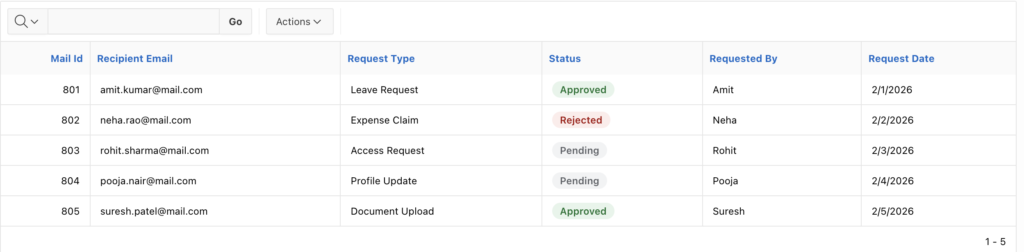
Email Template Pattern (CSS-Safe)
{case STATUS/}
{when APPROVED/}
<span class="os-badge os-badge--success">Approved</span>
{when REJECTED/}
<span class="os-badge os-badge--danger">Rejected</span>
{otherwise/}
<span class="os-badge os-badge--muted">Pending</span>
{endcase/}
Tip: keep CSS simple for email compatibility.
Checkout our sample app
Login: DEMO/DEMO
Team Usage Guidelines
- One CSS file, many templates
- Never hardcode colours in templates
- Prefer {case} over nested {if}
- SQL decides state, template decides look
- Any snippet reused twice becomes a standard
Final Thought
This library gives you:
- Consistent UI
- Cleaner templates
- Faster development
- Easier maintenance
Most APEX template mess happens because CSS and directives grow randomly.
This approach keeps both intentional and reusable.